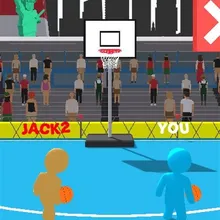

About Basketball Shoot
Basketball Shoot is a 3D basketball shoot game where you face a rival on the same hoop: drag to aim the dotted line, let go to throw, and be first to the target number of baskets. Every basket pushes you a step further back, so each shot is longer than the last.
Every level is different. You travel across ten courts, from a park and a beach to a downtown rooftop, a harbour, a desert and the Champions Arena, by day, at sunset and under floodlights, with fans in the stands who jump when you score. Wind arrives from level 4 and bends your shots, so you aim into it; moving blockers drift in front of the rim; every fifth level is a Shot Clock round against the timer, and every tenth is a Champion Match against a fast, gold-clad rival. Rivals get quicker as the levels climb, and the levels never run out.
Wins earn coins for nine balls, including a real beach ball, volleyball, football, handball and a big baseball as well as Ice Blue, Gold and Galaxy, plus three upgrades: Sweet Spot, Slow Rival and Coin Bonus. Basketball Shoot runs on phones, tablets and computers with no download.
Basketball Shoot at a glance
- Genre
- Sports
- Plays on
- Phone, tablet and computer, in any modern browser
- Screen
- Portrait (made for phones; fits any screen)
- Download
- 18 MB, no install
- Progress
- Saved in your browser; coins are shared by every TinyJar game
- Price
- Free (optional one-time Remove Ads)
- Updated
- 28 October 2026
How to play Basketball Shoot
- Tap Start. You are the blue player on the right; the banner tells you the level type and how many baskets you need.
- Press and drag up to raise the dotted aim line, and left or right to point it at the hoop.
- Let go to shoot. On windy levels the chip at the bottom shows the wind: aim a little against it.
- Reach the basket target before your rival (or before the shot clock runs out) to win the level and your coins.
Controls
- Computer
- Hold the left mouse button and drag to aim, then release to shoot.
- Phone and tablet
- Touch the screen, slide your finger to aim, and lift it to shoot.
Tips
- Drag straight up about a sixth of the screen height: that is the middle of the scoring zone.
- WIND << means the ball drifts left, so aim slightly right; WIND >> is the opposite. Stronger wind needs a bigger correction.
- On Shot Clock levels there is no rival, so shoot steadily rather than fast: a miss costs you a few seconds.
- Time your shots past the moving blockers instead of throwing while they cover the rim.
- Sweet Spot is the best first upgrade: a wider scoring zone turns near misses into baskets.
Featured in
Frequently asked questions
Is Basketball Shoot free?
Yes. Basketball Shoot is free to play in your browser on TinyJar Games, with no download or sign-up.
Can I play Basketball Shoot on my phone?
Yes. It works in the browser on Android phones, iPhones and tablets as well as on Windows, Mac and Chromebook computers.
Does my progress save?
Yes. Your level, best score, coins, ball colours and upgrades are saved in your browser on this device. Coins are shared by every game on TinyJar Games.
What can I buy with coins?
Nine balls: Classic, Ice Blue, Beach Ball, Volleyball, Football, Handball, Big Baseball, Gold and Galaxy, plus three upgrades: Sweet Spot, Slow Rival and Coin Bonus. Open the shop with the cart button at the top of the game.
How many levels are there?
The levels never end. Each level is generated from its number: the court changes every two levels across ten venues, wind and moving blockers come in from level 4, every fifth level is a Shot Clock round and every tenth a Champion Match, and rivals keep getting faster.
What happens if my rival wins?
You can retry the level, or once per match take a rematch: your rival loses their last two baskets and the game carries on. On a Shot Clock level the second chance adds ten seconds instead.